Got A New Computer?… Try These FREE Programs & FUN Shortcuts

Did you recently get a new computer? If so, here are some fun programs & computer shortcuts you might want to consider... In preparation for a little "outdoor computing" from the many porches of our new (soon-to-be-built) log home, we purchased a laptop computer for me this past weekend. For those who are keeping tabs... yes, that makes a total of 5 (working) computers in our household at this point. That's right... just two adults, no children, and two dogs -- but even they haven't … [Read more...]

Want To Be Notified Whenever Your Favorite Websites Are Updated?…

If you're like me, then you probably have a long list of great websites that you like to check out on a regular basis. But, who really has the time... Right? So you probably just add every site one-by-one to your growing list of bookmarks. Then, any time that you actually a) have the time, and b) remember to check back with your favorite sites... you're happy. More often than not, you probably find yourself asking, "Now, why didn't I check back here sooner?... I LOVE this … [Read more...]

Fun Quick Tips For Those Who Use The Internet & Carry A Cell Phone

If you're the type that knows just enough about computers to get by and you carry a cell phone merely for the ability to send & receive calls -- nothing more -- then listen up. Here are a couple of easy tricks to make your Internet and cell phone experience even better. In other words, if you're a technophobe or a newbie to digital gadgets, then these will be right up your alley! The following fast & easy tips are guaranteed to make your online experience even more enjoyable, … [Read more...]

Ways To Bypass Sites That Make You ‘Register First’

Did you know?... When you do a search in Google (or just about any other search engine), and the results include a link to one of those "newspaper" sites where you have to register first just to get the privilege of viewing their article... you don't actually have to register! Here are 2 quick & easy solutions for bypassing those online registration forms:   … [Read more...]

How To E-mail A Text Message… Plus Popular Shortcuts, Abbreviations, Internet Slang & ‘Leet’ Tips

text-messaging

Did you know that you can E-MAIL a Text Message to someone's cell phone? I did not know that. (...she says in her best Johnny Carson voice) Jim and I tried it today, and it worked!   There's More Than One Way To Send A Text Message Yes, you could sit there with your tiny cell phone in hand and click through all of the individual number keys that represent the letters... until you've compiled a brief Text Message to send to someone else's cell phone -- all in a matter of... … [Read more...]

The 3 Most Valuable Computer Tips You’ll Ever Use

fun-computer-tips

Following are 3 of the most valuable computer tips you may ever use. They'll save you time. They'll prevent future headaches. They'll put you in touch with things you never even knew existed! (...No, those are not the 3 tips. See below!)   3 Time-Saving Computer Tips #1 I'm always amazed when I come across another person who isn't aware of the fact that you can search for an individual word on any page on the Internet (or in any Windows document) that you have … [Read more...]

Best Way To Keep Your Taskbar Uncluttered

4tminimizer

4t Tray Minimizer is a nifty little FREE program that keeps the "taskbar" at the bottom lefthand side of your computer screen from getting too clogged up with all those Windows tabs showing the programs you've got open. I've used this program for the past 6+ years. With 4t Tray Minimizer installed on your computer, every time you click the button with the minus sign (in the upper right corner of every window you have open), that program gets sent to your "system tray" on the far right side … [Read more...]

15 Keyboard Shortcuts For Windows Users Who Prefer Keystrokes To Mouse Strokes

computer-shortcuts

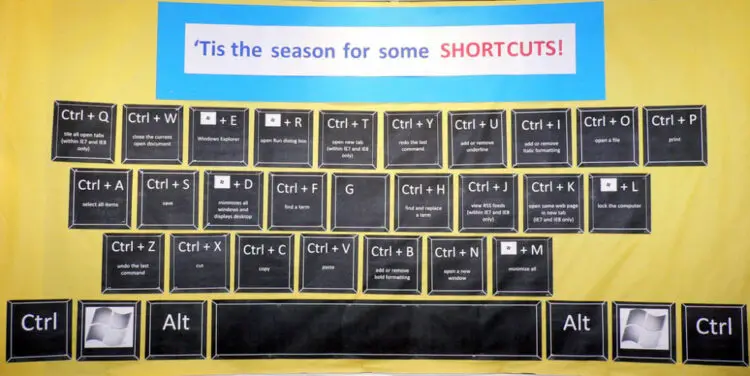
To help alleviate carpal tunnel symptoms, I've recently made a conscious effort to utilize more keyboard shortcuts over the typical mouse gestures when I'm at the computer. Following are some quick and easy computer shortcuts for you to try. Bonus: The keys communicate faster with the computer than the mouse does, so you're also saving time!   … [Read more...]